With the rapid pace of today’s sales cycle, speed and efficiency are crucial. Manually entering leads one at a time is simply not an option anymore. If you’re still using a manual system for your CRM, you’re already missing out on deals. That’s where a CRM tool for bulk lead upload comes into play.
Picture yourself adding thousands of leads in just seconds, allocating them in real-time, and planning follow-up calls without delay. It’s not just efficient; it gives you a definite edge that will help boost your sales numbers.
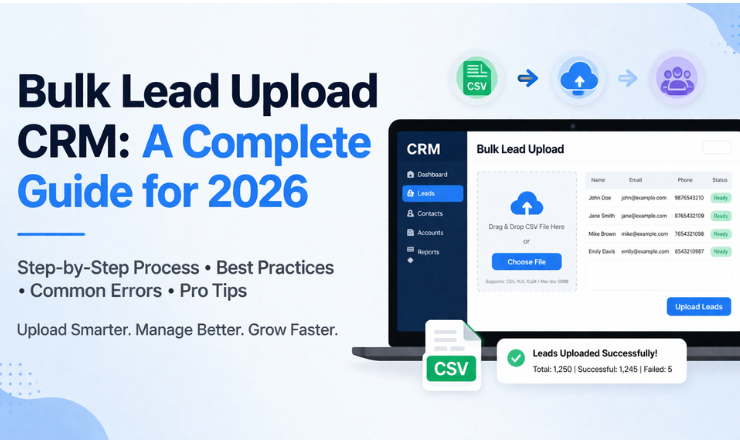
Here, you’ll find out how to add leads to CRM, what a bulk leads upload CRM can do, and how Swift Dial makes lead management easy through automation and more.
How to Import Leads in CRM Easily?
Having knowledge of importing leads in the CRM system is essential for sales teams or any other business operations. Proper importing techniques are essential because good leads become useless without them. Modern CRM software comes with an efficient tool known as “CRM contact import” that ensures proper data importing.
Here’s how you can do it properly:
1. Prepare your lead data carefully before uploading
It is imperative to ensure that you have clean, well-structured data with no duplicates before beginning the bulk lead upload CRM procedure. Arrange the columns in the list to facilitate efficient use by the call management software.
2. Choose the correct file format for compatibility
Most programs can read CSV files, and therefore, there is a need to know how to import CSV leads into the CRM software that supports them. CSV files are small in size, easy to modify, and widely used.
3. Map fields accurately using the CRM contact import tool
While importing, you will need to match your file columns with CRM fields. This step is crucial because improper mapping can break your workflow. A well-mapped dataset ensures your telecalling CRM with contact import runs smoothly and agents receive complete information.
4. Preview and validate before final import
Always check a sample preview before confirming the upload. This helps identify missing values or incorrect mappings early in the bulk lead upload CRM process.
5. Assign leads and trigger automation instantly
Once the import is complete, leads should be assigned automatically. Follow-ups can begin immediately using a CRM with auto call scheduling.
Understanding this process ensures you never struggle with how to upload data in CRM again.
Upload CSV Leads in CRM Step-by-Step
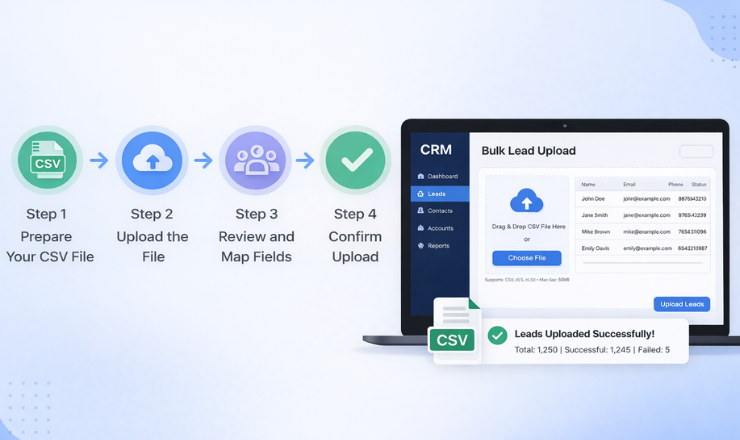
You need a clear understanding of how to upload leads from a CSV file into a CRM system. Using a structured process with each step outlined accurately provides the best chance for success as well as helps keep your team member’s productivity at its maximum.
Step 1: Create a well-structured CSV file with complete lead details
Start by preparing your lead database in Excel or Google Sheets. Include all essential fields, such as names, phone numbers, emails, and additional notes. A well-prepared file is the foundation of a successful bulk lead upload CRM process.
Step 2: Log into your CRM dashboard (Swift Dial)
Tools such as Swift Dial make it possible for users to have access to an easy-to-use platform where they can quickly locate the CRM contact import tool and initiate the upload process with ease.
Step 3: Navigate to the import or lead upload section
Locate the section dedicated to imports. This is where you’ll find options related to how to upload files in CRM and manage bulk data efficiently.
Step 4: Upload your CSV file into the system
Select your file and upload it. The CRM will automatically detect columns and prepare them for mapping, simplifying the upload CSV leads CRM process.
Step 5: Map fields accurately to avoid data mismatches
Match each column with the appropriate CRM field. This ensures your telecalling CRM has proper contact import functions and agents receive accurate lead information.
Step 6: Review the data and confirm the import process
Carefully check the preview to ensure everything is correct. Once confirmed, the bulk lead upload CRM process will be completed successfully.
Step 7: Activate automation and schedule follow-ups instantly
With a crm with auto call scheduling, your team can immediately schedule calls from CRM, ensuring no lead is left unattended.
CRM with Auto Call Scheduling Explained
A CRM with auto call scheduling is not just a feature, but it’s a necessity for modern sales teams that handle large volumes of leads daily. Otherwise, there is a high chance of losing business due to missed follow-ups and lack of conversion. With this function, every single lead contact will be scheduled without fail.
How It Works
- Leads are uploaded using a bulk lead upload CRM system
- The CRM automatically assigns leads to the right agents
- Calls are scheduled based on priority, time, or campaign rules
- Agents receive reminders and alerts for timely follow-ups
Key Benefits
- Lead acquisition is faster because of the availability of immediate data- The use of the CRM lead import system enables the uploading of thousands of leads within minutes, thus enabling immediate contact calls.
- Creation of a centralized database for efficient lead management- Having a centralized database makes managing leads easier.
- Increased efficiency in call management through built-in call management software- Using the built-in call management software, callers can make calls, record them, and analyze their results easily.
- Better analysis of the performance of campaigns and agents.
Telecalling CRM with Contact Import Benefits
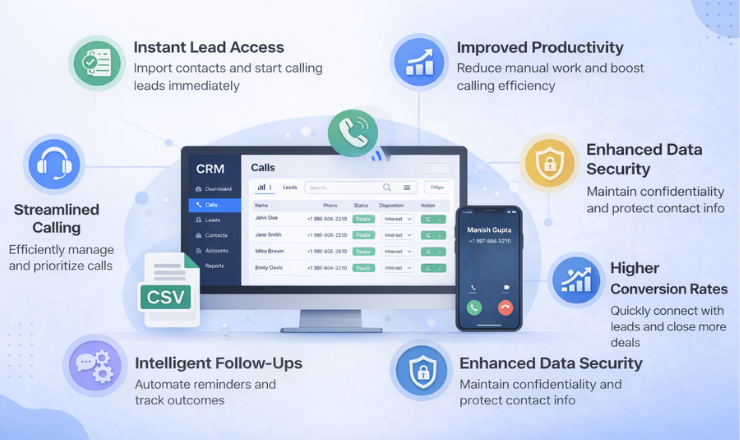
A telecalling CRM with contact import is essential for businesses that rely heavily on outbound calling campaigns. It combines lead management, call tracking, and automation into one unified system.
Once your team uploads leads using a bulk lead upload CRM, they can start calling immediately without delays.
Key Benefits
- Faster lead onboarding with instant data availability: Use a crm contact import tool to upload thousands of leads in minutes. Start calling right away without delays.
- Leads are stored in one location for improved management and tracking of leads: By having leads in a central database, leads can be easily managed, filtered, and given priority.
- The integration of various tools enhances calling efficiency: Built-in call management software allows agents to make the calls they need to make easily.
- Improved reporting and performance analysis: Detailed analytics show agent performance clearly. It also helps measure campaign effectiveness.
How to Upload Data and Files in CRM?
Understanding how to upload files in CRM and how to upload data in CRM is crucial for maintaining a smooth and error-free workflow. Whether you are handling leads, customer records, or documents, proper data upload practices can significantly improve your CRM performance.
Types of Data You Can Upload
- Lead databases in CSV format for bulk operations – This is the most common method used in a bulk lead upload CRM for managing large datasets.
- Customer records for ongoing relationship management – Helps maintain long-term engagement and track customer history.
- Call logs and interaction history for better insights – Useful for improving communication strategies using call management software.
- Documents and attachments related to customers or leads – Ensures all important information is stored in one place.
Best Practices
- Always use clean, structured, and validated data before uploading. This ensures your bulk lead upload CRM process runs smoothly without errors.
- Avoid duplicate entries to maintain data accuracy and efficiency. Duplicate leads can confuse your team and reduce productivity.
- Verify field mapping carefully using the CRM contact import tool. Proper mapping ensures data consistency and usability.
- Leverage automation features like auto call scheduling. Combine uploads with a CRM with auto call scheduling to maximize efficiency.
- Regularly update your CRM database for better performance. Keeping your data fresh improves decision-making and campaign success.
Best Call Management Software Features
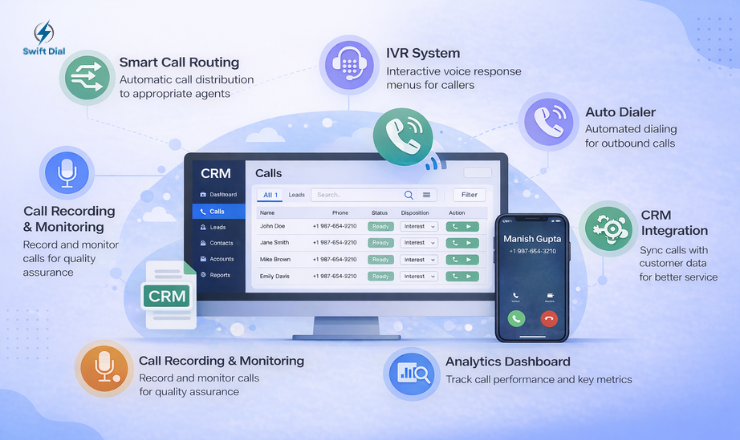
Choosing the right call management software is critical for maximizing the value of your CRM system. When combined with a bulk lead upload CRM, it creates a powerful ecosystem for managing leads and improving conversions.
Must-Have Features
- Auto dialer integration for faster calling processes: Automatically dials numbers after using a CRM contact import tool, saving time and effort.
- Recording of calls for the purpose of quality analysis and training: Assist managers in analyzing calls and enhancing the performance of agents.
- Real-time analytics for performance and outcome tracking: Gives detailed information about success rates and performance of campaigns.
- A lead tracking system for total visibility of the client journey: Keeps track of every touch point from first contact to final closure.
- An intelligent call scheduling system that is compatible with CRM workflow processes: Seamlessly integrates with the CRM and includes auto call scheduling.
- Multi-user access for efficient team coordination: Makes it possible for different agents to operate together without any confusion.
- Cloud access that ensures flexible working: Ensures quick access to CRM at all times.
Final Thought
Most businesses don’t fail because they lack leads. They fail because they fail to manage those leads effectively. A powerful bulk lead upload CRM eliminates that problem completely. with fast uploading, intelligent automation, and superior call management software, you will be able to create an efficient sales process. If you are looking to succeed in 2026, then you need to move away from slow and inefficient manual methods. Use tools like Swift Dial to simplify everything from how to import leads in CRM to schedule calls from CRM automatically.
FAQs
1. How to import leads in CRM easily?
Use a crm contact import tool, upload a CSV file, map fields, and confirm.
2. What is the best way to upload CSV leads CRM systems accept?
Use clean CSV files with proper formatting and correct mapping.
3. How to upload data in CRM without errors?
Clean your data, remove duplicates, and verify before uploading.
4. Can I schedule calls from CRM after uploading leads?
Yes, with Swift Dial and a crm with auto call scheduling, you can easily schedule calls from CRM.
5. What is a telecalling CRM with contact import?
It is a CRM designed for calling teams with fast lead import and tracking features.
6. Why is call management software important?
It helps track calls, improve performance, and ensures no lead is missed.