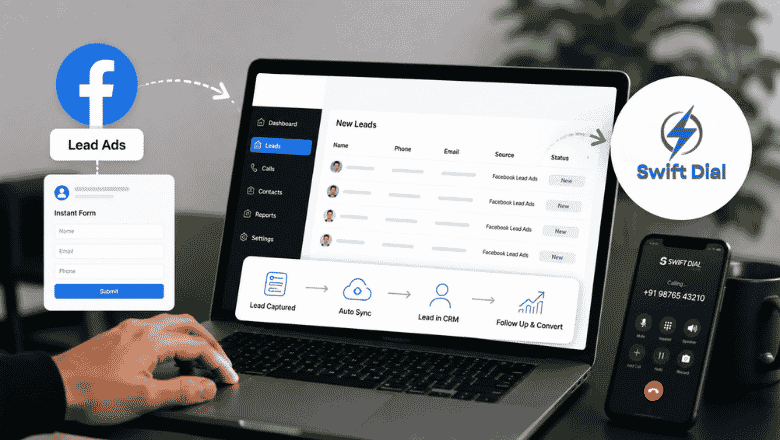
Facebook Lead Ads may result in a constant stream of potential clients for your business. But generating leads is only half the job. The real challenge begins when those leads start coming in. When you and your sales team need to manually download Facebook leads, keep an updated spreadsheet and assign calls, chances are that some of the leads will get lost on the way. The integration of Facebook lead ads will allow you to solve this issue since the leads’ information will automatically uploaded into your CRM.
Instant forms for Facebook Lead Ads collect users’ information without requiring them to move away from Facebook, thus collecting leads quickly and effectively. Swift Dial allows business owners to combine the process of collecting leads with the process of calls, follow-ups, tracking, and sales activity. This makes Facebook lead management more organized and helps sales teams respond to new enquiries faster.
Why Connect Facebook Lead Ads with a CRM?
Imagine a business running multiple Facebook campaigns. Leads arrive throughout the day, but the sales team checks Facebook only a few times. Some prospects receive a call after several hours, while others remain unnoticed.
This is where Facebook lead tracking becomes important. Connecting your campaigns with the best lead and call management CRM helps bring lead information into one place. Rather than having to download Facebook form leads manually, you can arrange your leads, allocate them to your sales agents, and start following up on them in a much quicker manner.
The connected system also enables your managers to have visibility into the sources of your leads and the performance of your sales teams.
How Does Facebook Lead Ads Integration Work?
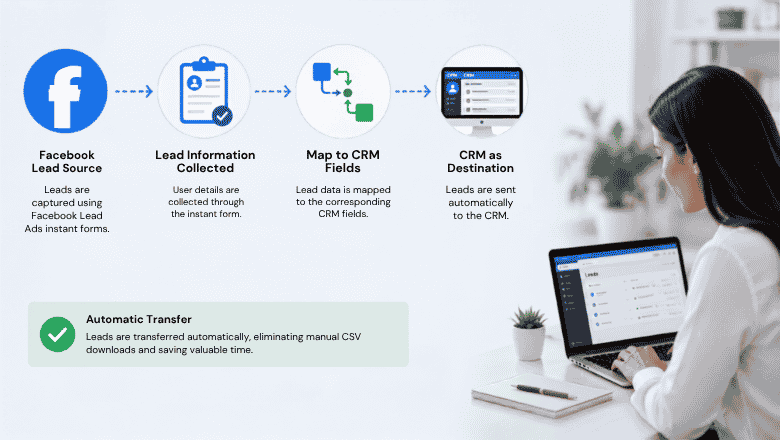
A typical integration connects Facebook as the lead source and the CRM as the destination. The lead information collected through an instant form is mapped to corresponding CRM fields. The integration can then transfer the information automatically instead of relying on manual CSV downloads.
For a calling team, the basic workflow can look like this:
Facebook Ad → Instant Form → Facebook Leads → Swift Dial → Sales Agent → Follow-up → Conversion
This simple flow turns Facebook lead generation into an organized sales process.
Step-by-Step Facebook Lead Ads Integration with Swift Dial
1. Connect Your Facebook Account
Start by connecting your Facebook advertising account with the CRM integration. The connection normally requires authorization so the system can access the relevant ad account and forms.
For Swift Dial, the goal is to create a smooth connection between your Facebook campaigns and your sales calling workflow.
2. Select the Right Lead Form
Businesses often run several campaigns and forms at the same time. Select the specific Facebook Page, campaign, and form from which you want to capture leads.
This ensures that the right Facebook form leads enter the appropriate sales workflow.
3. Map Facebook Leads to CRM Fields
Field mapping is an important part of Facebook Leads CRM integration. Match information such as name, phone number, email, campaign, and other relevant details with the corresponding CRM fields.
Proper mapping prevents missing or incorrectly placed information. The source documentation also recommends mapping required CRM fields and testing the connection after mapping.
4. Test Before Going Live
Before depending on the integration for live campaigns, run a test. A test helps confirm that information moves correctly from the Facebook form to the CRM.
Once everything works properly, publish the connection and start managing incoming leads through your sales workflow.
What Happens After a Lead Reaches Swift Dial?
Once Facebook leads reach your CRM, the sales process becomes much easier to organize. Instead of keeping prospects in different places, your team can manage them through a centralized Facebook lead management CRM.
With Swift Dial, teams can use the captured information to organize follow-ups, make calls, track conversations, and monitor sales activity. This makes it especially useful as a lead management CRM for calling teams.
A Better Workflow for Sales Teams
- New Facebook lead enters the CRM.
- Lead is assigned to the right sales representative.
- Agent contacts the prospect.
- Call activity is recorded.
- Follow-up is scheduled.
- Lead status is updated.
- Manager can monitor progress.
This process reduces unnecessary manual work and creates a more structured approach to Facebook lead management.
Why Facebook Lead Tracking Matters for Sales
Getting hundreds of leads does not guarantee hundreds of customers. Businesses need to know what happens after each enquiry arrives. Effective Facebook lead tracking helps managers understand which leads were contacted, which require follow-up, and which eventually converted. It also helps businesses evaluate campaign performance beyond simply counting leads.
For example, if one Facebook campaign generates 200 enquiries but another generates 80 highly qualified prospects, the second campaign may actually deliver better sales results.
Facebook Lead Ads Integration vs Manual Lead Handling
| Manual Process | Integrated CRM Process |
| Download Facebook leads manually | Leads move into CRM workflow |
| Update spreadsheets | Centralized lead records |
| Assign leads manually | Structured lead assignment |
| Delayed follow-ups | Faster sales response |
| Limited tracking | Detailed activity tracking |
| Difficult campaign analysis | Better performance visibility |
This difference becomes even more important when businesses generate large volumes of Facebook form leads.
Why Swift Dial Fits Best Calling-Based Lead Management CRM
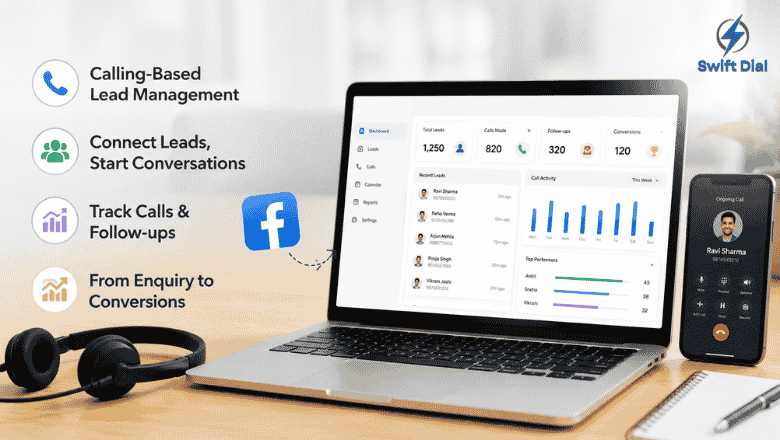
A good CRM should not stop at storing leads. Sales teams need tools that help them act on those leads. Swift Dial combines lead organization with calling-focused workflows, making it easier for teams to move from enquiry to conversation.
Businesses looking for the best lead management system for Facebook ads should consider how easily the platform connects lead capture, calling, follow-ups, and reporting.
For teams comparing the best CRM for Facebook leads, Swift Dial provides a practical approach where lead data and sales activity can work together.
Key Benefits of Facebook Lead Ads Integration
A properly configured Facebook lead ads integration app can help businesses:
- Reduce manual lead entry.
- Improve response time.
- Organize customer information.
- Track follow-up activity.
- Improve sales accountability.
- Connect marketing and sales teams.
- Identify better-performing campaigns.
- Automatically import data into your CRM
For businesses using Swift Dial, this creates a more connected process from Facebook lead generation to customer conversion.
Conclusion
Facebook Lead Ads can be used to create good leads; however, the business should have a good way to convert these inquiries into actual clients. The integration of the Facebook lead ads provides many benefits such as eliminating manual data entry.
With Swift Dial, businesses can bring Facebook leads, calling, follow-ups, and sales tracking closer together. Whether you need the best lead management system for Facebook ads, a Facebook leads CRM integration, or an effective Facebook lead management CRM, connecting your advertising and sales workflow can make every lead easier to manage and every sales opportunity easier to follow.
FAQs
1. What is Facebook Lead Ads integration?
Facebook lead ads integration connects Facebook lead forms with a CRM so businesses can manage incoming enquiries more efficiently.
2. How does Facebook lead tracking help sales teams?
Facebook lead tracking helps teams monitor lead status, calls, follow-ups, and conversions after an enquiry is generated.
3. Can Facebook form leads be managed through Swift Dial?
Yes, a properly configured workflow can bring Facebook form leads into a centralized sales process for calling and follow-up.
4. What makes Swift Dial useful for Facebook leads?
Swift Dial combines lead management and calling workflows, helping sales teams organize prospects and follow up efficiently.